PDF to EXCEL
This PDF to Excel converter helps to convert PDF to editable Excel spreadsheet while retaining the formatting.
 Secure Conversion
 AI Powered
 Fast Processing
 95% Data Accuracy

Scan the QR code to Upload the Photo From Mobile
or
Drag and Drop / Paste (Ctrl+V)
File Supported: PDF
Scan the QR code to Upload the Photo From Mobile


 The data privacy does matter: we will never share or sell your data. Read our
Terms of Service
and
Privacy Policy.
The data privacy does matter: we will never share or sell your data. Read our
Terms of Service
and
Privacy Policy.
Working with industry leaders
We’re a proud partner of these globally recognized brands:


How to Convert PDF to Excel Online
Get started in just three easy steps!

Drag and drop your PDF file into the converter box above, or click ‘Upload File’ to choose from your device.
Click “Convert” and our AI algorithm quickly scans the PDF, identifies tables, and neatly arranges the data into a spreadsheet layout.
Within seconds, the converted XLSX sheet appears on your screen. Review, edit if needed, and click ‘Download’ to save it.
Why Convert PDF to Excel with Cardscanner?
Here are the standout features and benefits of using Cardscanner for PDF to Excel conversion:

Interactive Online Editing:
The only converter that lets you fix typos, change numbers, or adjust layout right on your screen before downloading the final file.

Smart AI Table Recognition:
Our advanced extraction tech instantly detects table rows, columns, and borders, so your data stays organized and accurate during transfer.

Zero Formatting Loss:
Enjoy accurate conversion that keeps the formatting clean, organized, and intact as it was in the original PDF.

Blazing Fast Processing:
No waiting, no delays. Upload your PDF and convert your static PDF into an editable Excel sheet in just a few seconds.

Bank–level Security:
Your sensitive business and financial data is secure with us. All files are fully encrypted and automatically deleted from our servers right after download.

No Registration Required:
Skip the sign–up process. Convert your PDF to Excel instantly without creating an account or giving away your email address.
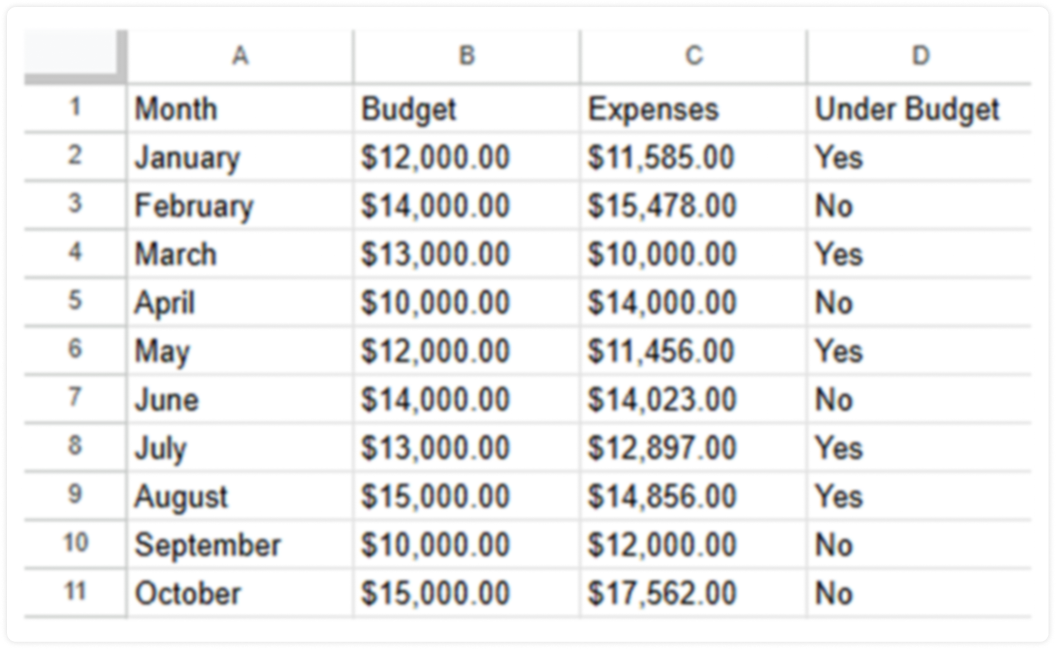
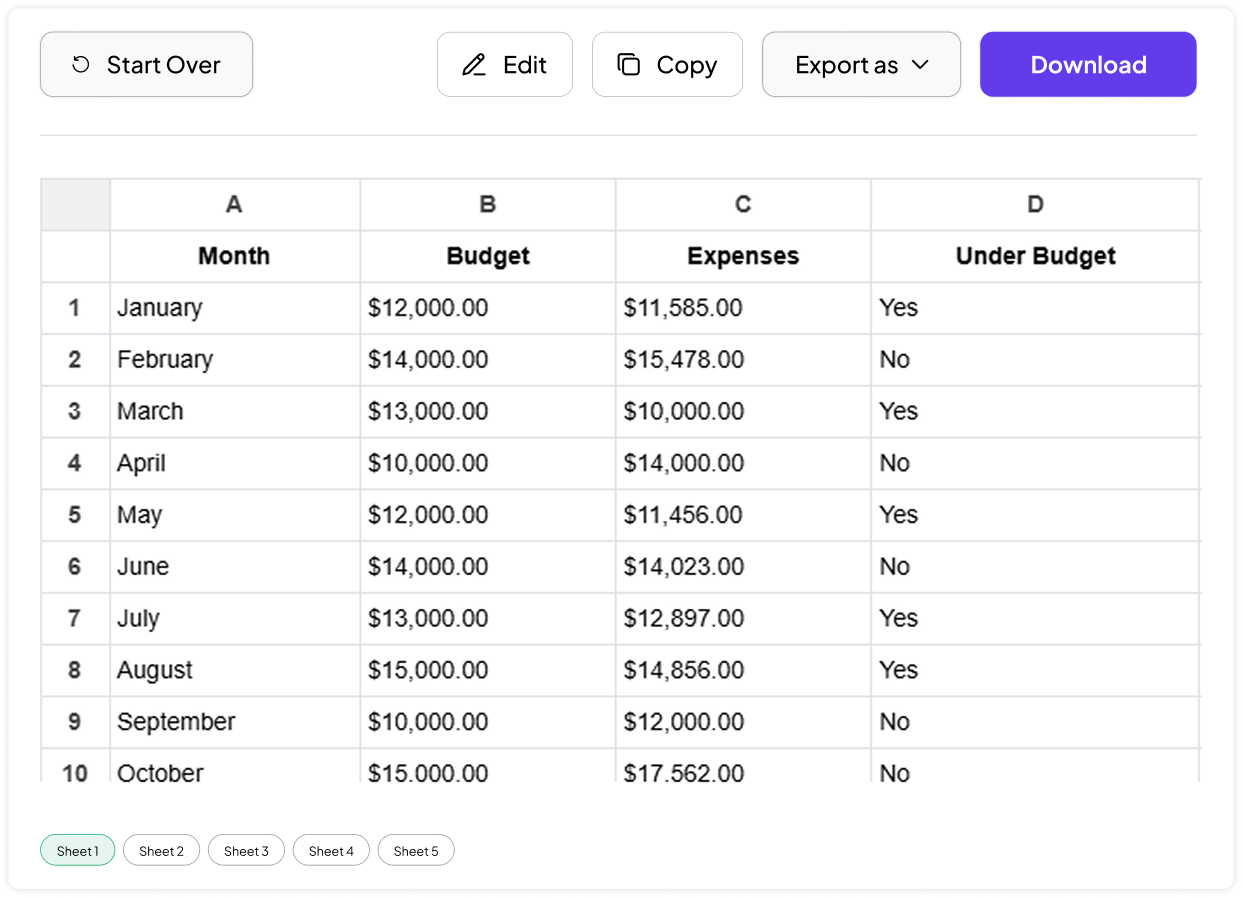
Your PDF vs. Our Excel Output
Take a look at how our PDF to Excel converter turns your PDFs into editable Excel sheets.
Before
Assume this is your static PDF document before conversion.
After Conversion
Here is the resulting editable Excel sheet.
Who Can Use Cardscanner's PDF to Excel Converter
This tool is designed for everyone who wants to quickly convert PDF to Excel without any technical skills. Some of the most common use cases are listed below:
Finance & Accounting Teams:
Convert invoices, financial statements, and expense reports into Excel for easier calculations, auditing, and accurate record keeping.
Business Analysts:
Extract data from PDF reports into Excel to sort, filter, visualize trends, and perform deeper business analysis.
Students & Researchers
Turn tables from research papers, surveys, and study materials into editable spreadsheets for analysis and reporting.
Office Professionals
Convert PDF documents into Excel to simplify data entry, reporting tasks, and day-to-day document management.
Sales & Operations Teams
Transform order forms, customer lists, and inventory reports into Excel for better tracking and operational efficiency.
Healthcare & Medical Staff
Convert patient records, lab reports, and medical data from PDFs into Excel for organized reporting and analysis.
Tips to Get the Best Conversion Results
 Use the sharpest PDF available. Native (digitally created) PDFs convert more accurately than scans.
Choose the right sheet layout. If your PDF has several unrelated tables, export each to its own sheet to avoid mixed data.
Check number formatting after conversion. In some cases, currency symbols, decimal places, or thousand separators may require a quick adjustment.
Clean tables convert best. PDFs with clear gridlines or consistent spacing between columns produce the most accurate results, especially with OCR.
Use the sharpest PDF available. Native (digitally created) PDFs convert more accurately than scans.
Choose the right sheet layout. If your PDF has several unrelated tables, export each to its own sheet to avoid mixed data.
Check number formatting after conversion. In some cases, currency symbols, decimal places, or thousand separators may require a quick adjustment.
Clean tables convert best. PDFs with clear gridlines or consistent spacing between columns produce the most accurate results, especially with OCR.
Frequently asked questions
Yes. Our tool supports OCR (Optical Character Recognition), which means even scanned or image-based PDFs can be converted into editable Excel sheets.
Absolutely, you can convert your PDF documents to editable MS Excel files for free with limitations. For advanced conversions, there are premium options available.
You can download your file as a standard .xlsx spreadsheet. It is fully editable and perfectly compatible with Microsoft Excel, Google Sheets, and Apple Numbers.
Yes. Our premium users can upload and convert multiple files in a single batch, saving time on recurring documents like monthly statements or invoices.
Yes. Free users can convert files up to 20 MB and process one file at a time, with a daily limit of 20 conversions. Pro users enjoy the same 20 MB file size limit but unlock unlimited daily conversions and the ability to convert up to 10 files simultaneously.
Yes. Our converter works entirely in your browser, so you can convert PDFs to Excel from your phone or tablet without installing an app.
For best results, follow the tips section discussed above and re-upload the PDF document into this converter.






 Unlock Multiple